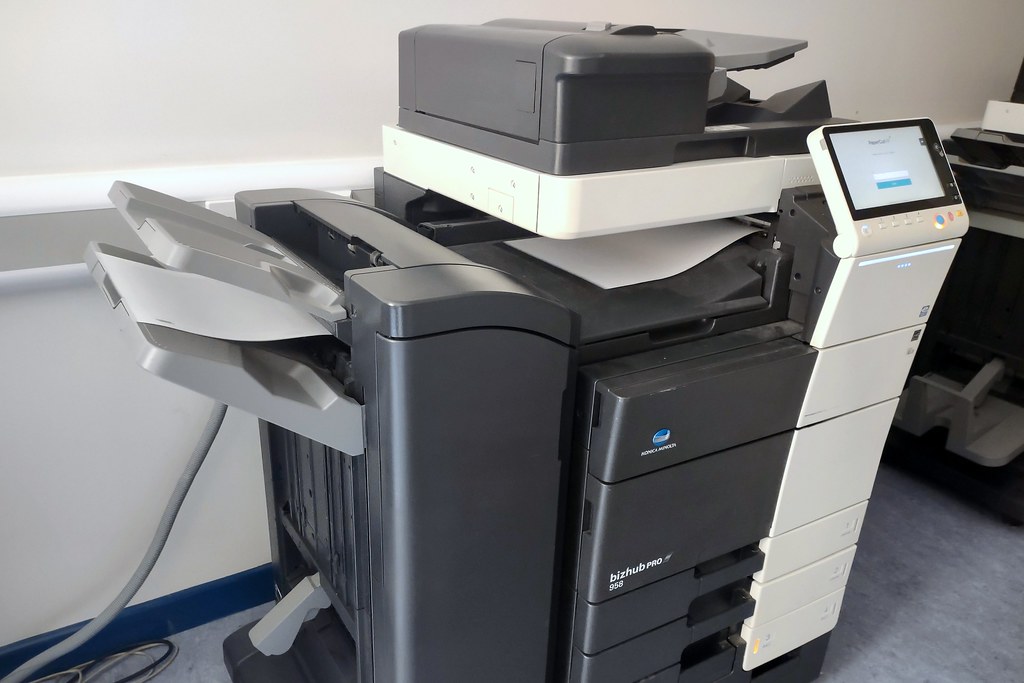
Looking for a copier that delivers fast prints without breaking down? Meet Konica Minolta photocopiers. They punch far above their weight in office settings, handling high volumes, reducing errors, and cutting costs. You’ll soon see why they’re a smart investment and exactly how CBE supports you with them.
Why Konica Minolta Photocopiers Stand Out
Fast, Clean Output That Keeps You Moving
Speed matters in busy offices. Want a copier that prints at 45 ppm (pages per minute) while still producing crisp text and sharp images? That’s Konica Minolta. Their color models don’t sacrifice quality for speed, so presentations and marketing materials look pro-grade, without jams or smudges.
Tip: If you print over 5,000 pages a month, aim for a mid-range model with a built-in finisher for stapling and booklet making.
Smart Features That Make Daily Work Easier
These machines aren’t just printers with a scan button. They’re loaded with features like:
- Touchscreen control panels that feel like smartphones
- Mobile and cloud printing (send jobs from your phone or Dropbox)
- Duplex scanning/printing to save paper
- Custom workflows, scan to email, convert to searchable PDFs
That means fewer steps, less hassle, and fewer staff training issues.
Tip: Personalize the home screen with shortcuts, like “Invoice scan” or “Confidential print.” It’s quick, simple, and boosts productivity.
Built Tough to Reduce Downtime
Office gear isn’t trusted unless it lasts. Konica Minolta copiers are built for high monthly volumes. Say goodbye to frequent service calls. And with toner that lasts for thousands of prints, your cost per page stays stable.
Tip: Arrange a quarterly check-up with CBE. Preventive maintenance keeps your device humming and protects your budget.
CBE’s Konica Minolta Copier Service: Expert Support You’ll Actually Understand
When you click the service page for Konica Minolta photocopiers at CBE, you get real help, not just a brochure.
Here’s why it matters:
- Tailored fit: CBE’s team listens first. What do you print most, graphs, invoices, or marketing files? They match the right model and specs to your needs.
- Seamless setup: Delivery, installation, and user training—they handle it all while you carry on working.
- Transparent costs: No mystery fees. Whether it’s a toner swap or firmware update, CBE lays it out directly.
- Quick responses: Same-day service on most calls. They’ve got a solid stock of parts and toner to get you back on track fast.
Action: Check out CBE’s service page on Konica Minolta Photocopiers for model options, support FAQs, and to request a quote.
Which Konica Minolta Copier Is Right for You?
Here’s a guide to match volume and needs:
- Light use (under 2,000 pages/month)
- Go for a compact device with basic finishing options. Keeps costs low and handles day-to-day tasks.
- Medium volume (2,000–10,000 pages/month)
- A solid mid-tier model with dual paper trays and touchscreen UI. Good for teams and light scanning.
- Heavy use (over 10,000 pages/month)
- Full-blown multifunctional units with booklet makers, envelopes, heavy paper handling, and robust scanning. Great for high-demand environments.
Tip: Even if today’s volumes are low, plan. Look for devices that scale easily with paper drawers and accessories.
Real-World Takeaways
- Lower cost, longer life: High-yield toner + smart power modes = lower running costs. No guessing games on page pricing.
- Easy to use: Staff training takes minutes, not hours. A familiar touchscreen UI means people use the features.
- Backed by experts: CBE doesn’t throw a device at you and then run. They support you throughout the life of the machine.
- Future-ready: Mobile and cloud workflows are built in. The systems easily integrate with Microsoft 365, Google Workspace, and document management tools.
Why It Matters
Imagine this:
You’re about to hit PRINT on a 50-page report. Last time, it jammed halfway, and you wasted five minutes fixing it. Plus, some pages came out skewed, and the toner was low halfway through the job.
With Konica Minolta, that’s history. Rapid, reliable printing means no jams. Toner and paper sensors alert you ahead of time. And any hiccups are handled quickly by CBE.
More uptime. Fewer distractions. A smoother day.
Final Thought
If you want a copier that works hard, lasts long, and stays simple to use, choose Konica Minolta. When backed by CBE’s service, you get fast setups, clear pricing, and quick fixes. No sales fluff, no surprises, just prints that show up when you need them.
Why it matters
This isn’t just about buying a machine. It’s about cutting hassle, saving time, and letting your team focus on work, not copiers.
Go ahead: drop that link into your team’s shared doc. Try the quote tool on CBE’s service page and make printing one less thing to worry about.
FAQs
They balance speed, reliability, and support. Lower-priced brands may print more cost-effectively in the short term, but downtime and service issues ultimately cost more in the long run.
It varies by model and your usage pattern. Expect between 1.5p (black) and 10p+ (color) per page. CBE can provide exact figures based on your print averages.
Yes. Konica Minolta supports Wi-Fi Direct, AirPrint (iOS), Morphia (Android), and integrates with cloud services like Google Drive. Printing from mobile is quick and smooth.
CBE provides support on most fault calls. They keep toner and spare parts stocked and will fix issues fast.
For sure. Models include OCR scanning. Turn a printed invoice into a searchable, editable PDF in one tap.
If you want to know more about Legal Billing Tools You Need Now: 10 Options Compared, then visit our Tech category.