Recently, I came across this page about AI-enhanced MVP development:
https://kavitasystems.com/our-services/ai-enhanced-mvp-development
The team at Kavita Systems also shared their perspective with me on how they approach MVP development today: starting with discovery, validating the core idea before overbuilding, using AI where it actually improves the workflow, and keeping the first version focused enough to test the riskiest assumptions.
That made me think about how differently teams understand the word “MVP” now.
For one team, an MVP is a landing page with a signup form. For another, it is a clickable Figma prototype. For someone else, it is the first working version of a SaaS platform with authentication, payments, a dashboard, an admin panel, and some kind of AI feature inside.
And this is where the problems start.
Whenever someone says, “We need an MVP,” I almost always want to ask: What kind of MVP do you actually mean?
An MVP Is Not Just a Smaller Product
The classic meaning of MVP is Minimum Viable Product.
But I would put less emphasis on “minimum” and more emphasis on viable.
A product should not just be small. It should be valuable enough for users to understand why they need it.
A weak MVP answers this question:
Were we able to build something?
A strong MVP answers a very different question:
Is there real value here — something users are willing to pay for, spend time on, or change their behavior for?
These are not the same thing.
You can spend months building a polished interface, backend logic, AI integration, authentication, billing, and an admin panel — only to realize that users do not actually care about the problem.
Or you can run a simple test in two weeks, talk to early users, and realize that the product should be built in a completely different way.
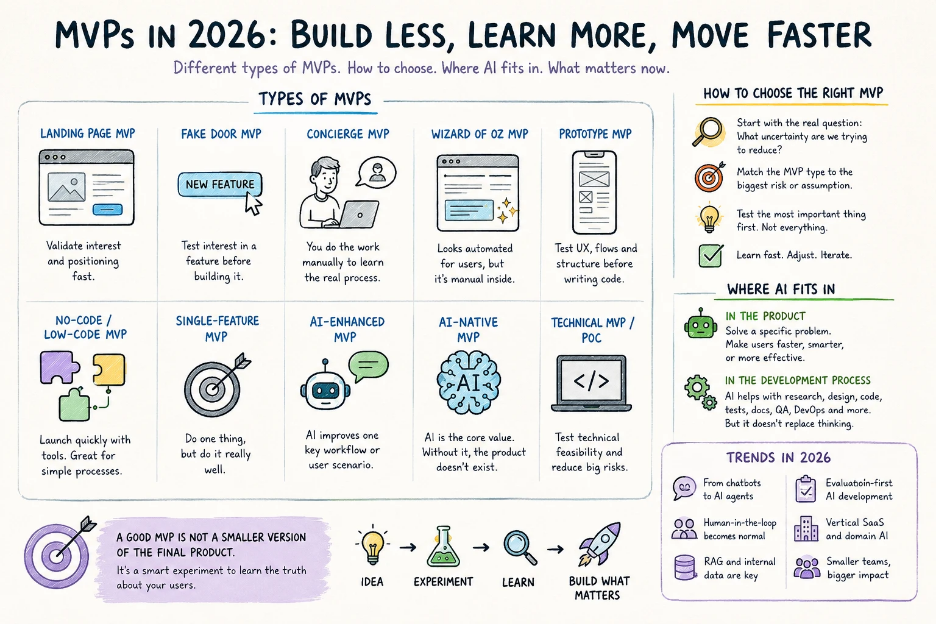
Types of MVPs
Landing Page MVP
The simplest format is a landing page.
You describe the problem, the solution, the value, and add one clear action: join the waitlist, request a demo, or get early access.
This works well when the idea is still early and you need to understand whether there is any interest at all.
But there is one important limitation: a landing page validates interest, not real product usage. Someone may leave an email out of curiosity. That does not mean they will pay.
Use it when you need to quickly validate demand, positioning, or the target audience. Avoid it when the value of the product can only be understood through real usage.
Fake Door MVP
A Fake Door MVP is when you add a button or feature to an interface even though the feature does not fully exist yet.
For example, it might be a button like “Generate AI Report” or “Export to CRM.” The user clicks it and sees a message that the feature is coming soon or gets invited to join a waitlist.
This format works well if you already have a product and want to test whether users actually care about a new feature.
But you need to be careful. A Fake Door MVP should not feel like a trick. Users should understand that the feature is being tested or is in development.
Use it when you already have a product and want to test interest in a new feature. The main risk is damaging trust if it feels too manipulative.
Concierge MVP
A Concierge MVP is when the team manually does the work that the product is supposed to automate later.
For example, let’s say you want to build an AI service that analyzes candidate resumes and creates a shortlist. Instead of immediately building a complex AI system, you can collect resumes, analyze them manually, use experts or AI tools as support, and send the result to the client.
The user still receives value, and the team learns how the process really works.
This format is especially useful for B2B products, where the challenge is often not just writing code but understanding the client’s real workflow: what data they provide, what result they expect, what they want to control, and what they are actually willing to pay for.
Use it when the process is complex and you do not fully understand the user’s workflow yet. The downside is that it is hard to scale because a lot of the work is still manual.
Wizard of Oz MVP
This is similar to a Concierge MVP, but with one key difference: the user sees an interface that looks automated, while part of the process is still handled manually behind the scenes.
For example, a user uploads a document and receives an “AI analysis.” But in the first version, that analysis may be prepared by a person using AI tools, templates, and their own expertise.
For AI products, this is a very practical approach.
Many founders want to immediately build an AI agent, RAG, integrations, a vector database, data pipelines, and an evaluation framework. But before all that, it is worth answering a much simpler question:
What result does the user actually find valuable?
Maybe they do not need an “AI agent.” Maybe they need a short list of risks, a clear explanation, and a button that tells them what to do next.
Use it when you need to validate the AI experience before building full automation. In sensitive areas like healthcare, finance, law, or HR, user expectations need to be handled very carefully.
Prototype MVP
A Prototype MVP is usually a clickable prototype, often built in Figma.
It does not have real logic, a database, or backend functionality. But it shows the product structure, screens, user flow, and key interactions.
This type of MVP is useful when you need to test UX, align the team, estimate development costs, pitch the idea, or collect early feedback before writing code.
As a UX/UI designer or UX engineer, I see prototypes as one of the most valuable stages. This is where you often discover that an idea that sounded simple in conversation becomes complex and confusing once it turns into an interface.
A prototype lets you make mistakes cheaply. And that is much better than discovering the same problems after development.
Use it when you need to validate user flows, UX, and product structure before writing code. Avoid it when the main question is technical feasibility or whether users are ready to pay.
No-Code / Low-Code MVP
No-code and low-code tools have become a normal way to test ideas quickly.
Webflow, Bubble, Glide, Softr, Airtable, Make, Zapier, Retool, and AI-powered builders allow teams to create a first version without full custom development.
This works especially well for internal tools, simple CRMs, early-stage marketplaces, directories, request forms, workflow automation, and simple SaaS products.
The advantage is obvious: speed.
But there are trade-offs: scalability, custom logic, performance, security, code ownership, and long-term flexibility.
A no-code MVP is not a bad thing. What is risky is confusing it with a production-ready product.
Use it when you need to quickly validate a process or business model. Avoid it when the product needs complex architecture, high performance, custom AI logic, or serious security.
Single-Feature MVP
This is one of the strongest formats for modern product development.
A Single-Feature MVP does one thing — but does it well.
Instead of building a full CRM, you build only AI summaries of calls. Instead of building a full marketing platform, you build only a generator for ad hypotheses. Instead of building a complete clinic management system, you build only online appointment booking.
This is harder than it sounds because the team has to say no to everything else.
But that is exactly what often saves an MVP. It is better to build one strong feature than ten weak ones.
Use it when there is one clear problem you can solve better than others. The main advantage is that it is easier to test, sell, and improve.
AI-Enhanced MVP
An AI-Enhanced MVP is a product where AI is not the entire product, but it improves one important scenario.
For example, AI can help users fill out a form, summarize information, classify requests, search a knowledge base, generate a draft response, analyze documents, or provide recommendations.
In my opinion, this is the most realistic AI format for many MVPs.
Not every product needs to be “AI-first.” Often, it is enough to find one place where AI genuinely saves time or reduces cognitive load.
A weak example:
Let’s add an AI chat to the dashboard.
A better example:
The user uploads a contract, and the system highlights risks, explains them in simple language, and suggests next steps.
Use it when the product includes repetitive tasks, text, documents, search, classification, or recommendations. The main risk is adding AI as decoration instead of real value.
AI-Native MVP
An AI-Native MVP is a product where AI is the core value. Without AI, the product basically does not exist.
This could be an AI agent for analyzing tenders, an AI system for legal due diligence, an AI analyst for eCommerce, an AI assistant for recruiting, or an AI copilot for a specific profession.
This is a more complex level. It is not enough to just connect the OpenAI API.
You need to think about data quality, hallucinations, evaluation, security, logging, human review, inference costs, fallback scenarios, and liability.
An AI-Native MVP can look impressive in a demo but fail in real usage if there is no quality control.
Use it when AI is the main reason the product exists. Avoid it when the same value can be delivered with simple rules or regular automation.
Technical MVP / Proof of Concept
Sometimes the main question is not demand. It is whether the thing can be built at all.
Can we integrate with the required API? Can the architecture handle the expected load? Can we build RAG on complex documents? Can we reach the required level of AI accuracy? How much will the AI infrastructure cost?
This type of MVP may not look beautiful. Sometimes it is just a backend, API, admin panel, or technical prototype.
But its value is that it answers one critical question:
Can we actually build this?
Use it when there is a high technical risk. This is especially relevant for AI, fintech, healthtech, logistics, enterprise SaaS, and data-heavy products.
How to Choose the Right MVP
I would not start with the question, “What do we want to build?”
I would start with:
What uncertainty are we trying to reduce?
If you do not know whether there is demand, start with a landing page or Fake Door MVP. If you do not understand the client’s process, use a Concierge MVP. If you need to validate UX, build a prototype. If you need to launch quickly, consider no-code or low-code. If there is one strong feature, build a Single-Feature MVP. If AI improves one specific workflow, it is probably an AI-Enhanced MVP. If AI is the foundation of the product, it is an AI-Native MVP. If the biggest risk is technical, start with a PoC.
The most common mistake is building a full product when the team should first validate demand.
The second mistake is adding AI where users simply need a fast, clear, and reliable feature.
The third mistake is treating an MVP as a small copy of the future platform. An MVP should not be a mini version of everything you want to build later. It should test the most important assumption.
Where AI Is Actually Useful in an MVP
AI can be used in two different ways: as part of the product and as part of the development process.
These are not the same thing.
AI as Part of the Product
AI should solve a specific problem.
Not:
We have AI.
But something much more concrete: users make decisions faster, support teams respond faster, documents are analyzed in minutes, the system identifies risks, or users get a clear summary instead of raw data.
AI should be integrated into the user experience. Not as a random “Ask AI” button added for the pitch deck, but as part of a real workflow.
AI as Part of the Development Process
AI is already changing how MVPs are built.
It can help with market research, competitor analysis, user flows, UX copy, prototyping, front-end components, backend boilerplate, tests, documentation, QA, log analysis, and DevOps tasks.
But there is one important point: AI speeds up the team, but it does not replace thinking.
Without architecture, code review, testing, a design system, and a clear process, AI simply helps you create chaos faster.
That is why people talk so much about “vibe coding” in 2026. It is when code is generated quickly with AI tools, the product feels like it is moving forward, but under the hood there is technical debt, weak architecture, and unclear decisions.
For a demo, that might be fine. For a real product, not always.
MVP Development Trends in 2026
From Chatbots to AI Agents
Chatbots were the first wave.
Now the focus is shifting toward AI agents that do not just answer questions but perform tasks. They can search data, call APIs, create documents, update CRM records, analyze errors, run workflows, and prepare reports.
But an AI agent is not magic. It needs permissions, limits, logging, fallback scenarios, and human approval for critical actions.
For an MVP, the important question is:
What task can the agent complete from start to finish — and where does a human need to review it?
Human-in-the-Loop Becomes Normal
In many products, full automation is not needed at the start.
Especially in healthcare, finance, law, HR, insurance, and B2B operations.
AI can prepare an answer, but a person should review it. AI can detect risks, but an expert should confirm them. AI can suggest an action, but the user should control the final step.
For an MVP, this is actually an advantage. You do not need to build perfect automation right away. You can start with an AI-assisted workflow.
RAG and Internal Data
Many AI products are no longer built around “just a chatbot.” They are built around a company’s own data: documents, knowledge bases, CRM records, support tickets, contracts, instructions, logs, and call transcripts.
This is where RAG is often used. The system first retrieves relevant information, then generates an answer based on that information.
But RAG is not a magic button.
You still need to think through what data you use, how you clean and update it, how you evaluate answer quality, how you show sources, and how you protect sensitive information.
Evaluation-First AI Development
In traditional software development, we check whether a feature works.
In AI development, we need to check not only whether it works, but how well it works.
For an AI MVP, you need to define what a good answer looks like, which mistakes are critical, how quality is measured, who reviews the results, and how hallucinations are tracked.
Without evaluation, an AI feature can look great in a demo and still fail in real usage.
Vertical SaaS and Domain-Specific AI
Generic AI tools are slowly giving way to more specialized products.
AI for clinics, hotels, eCommerce, recruiting, legal operations, procurement, construction estimates, or B2B support will usually be more valuable than another generic “AI assistant.”
The winners are not the teams that simply “add AI.” The winners are the teams that understand the domain, the data, the workflow, and the user’s real pain.
Smaller but Stronger Teams
AI allows smaller teams to do more.
One strong product designer, UX engineer, or full-stack developer using AI tools can now cover much more than before.
But this only works when there are clear requirements, architecture, a design system, code review, testing, CI/CD, documentation, and ownership.
Otherwise, AI just speeds up mistakes.
Design Systems from the Start
In the past, teams often postponed the design system until later.
For an MVP, that made sense: the budget is limited, and the team needs to test hypotheses quickly.
But in 2026, a design system does not have to mean a huge component library with hundreds of pages. It can simply mean a clear foundation: typography, colors, spacing, buttons, forms, states, accessibility, and components that do not contradict each other.
This matters especially if the product is expected to grow.
AI can help with documentation, UX copy, component variations, and consistency checks. But the core rules still need to be defined by the team.
What I Would Choose in Practice
For a completely new idea, I would start with a landing page, interviews, and a prototype.
For a SaaS product, I would start with a prototype and then move to a Single-Feature MVP.
For an AI product, I would start with a Concierge MVP, Wizard of Oz MVP, or Technical PoC.
For a B2B product, I would start with discovery, a prototype, and a pilot with one to three clients.
For a marketplace, I would start with a semi-manual MVP to validate supply and demand.
For an internal tool, I would start with no-code or low-code.
For a product with high technical risk, I would start with a PoC, not a polished interface.
And most importantly, I would not try to build the “perfect platform” right away.
An MVP is not about perfection. It is about honest validation.
Final Thoughts
In 2026, an MVP is no longer just the first version of a product.
It is a way to reduce uncertainty.
There are many MVP formats: landing page, fake door, concierge, wizard of oz, prototype, no-code, single-feature, AI-enhanced, AI-native, and technical MVP.
There is no single correct choice for everyone.
The real question is:
What exactly are we trying to validate right now?
Demand? UX? Willingness to pay? Technical feasibility? AI quality? Business workflow? Scalability?
AI is a powerful tool in this process. It can speed up design, development, testing, analytics, and the product itself. But it does not replace product thinking, UX, architecture, or responsibility for quality.
I think that in 2026, the winners will not be the teams that “generated a product” the fastest.
The winners will be the teams that know how to test assumptions quickly, avoid falling in love with unnecessary features, use AI where it actually creates value, and build MVPs not as cheap copies of future platforms, but as smart experiments.
Because a good MVP is not “less product.”
It is less noise and more truth about the user.