The most effective office efficiency strategies remove friction rather than add gadgets: a layout that separates focus work from collaboration, good light and fresh air, controlled noise, technology that cuts repetitive admin, flexible working patterns and real support for wellbeing. Get those six fundamentals right and people spend more of their day doing useful work instead of fighting their surroundings.
Walk into many offices and you will see the same productivity drains: monitors set too low, glare across screens, constant interruptions and meeting rooms booked by people who only need a quiet corner. None of these problems needs a lavish fit-out to solve. They need deliberate choices, sensible priorities and a bit of follow-through.
This guide covers each strategy in practical terms, explains how to decide what to tackle first, and highlights the mistakes that make so many efficiency drives fizzle out.
The Hidden Cost of an Inefficient Office
Most managers watch the obvious costs, such as rent, salaries and software subscriptions, while overlooking the time lost to the working environment itself. That cost rarely appears on a spreadsheet, but it shows up in slower project delivery, more mistakes, higher absence and staff who quietly start looking elsewhere.
Interruptions are a good example. Research on task switching consistently shows that once someone is pulled out of concentrated work, it takes a meaningful amount of time to get back to the same depth of focus. Multiply a handful of interruptions a day across a whole team and the lost hours add up quickly.
The common mistake is to respond with longer hours or stricter rules. That treats the symptom. The real culprits are often environmental: poor lighting causes eye strain and fatigue, uncomfortable seating fragments attention, stuffy rooms make people sluggish and unpredictable noise keeps everyone on edge. Fix the environment and the workflow, and output tends to follow.
1. Design Your Layout for Workflow, Not Just Looks
Many office layouts are designed to photograph well rather than to support how people actually work. A useful layout starts with a simple question: what kinds of work happen here, and where should each one take place?
Create distinct work zones
- Collaboration areas with whiteboards, movable furniture and clear sight lines, placed away from people who need to concentrate.
- Quiet focus zones with acoustic panels, desk screens and an understood rule that conversations move elsewhere.
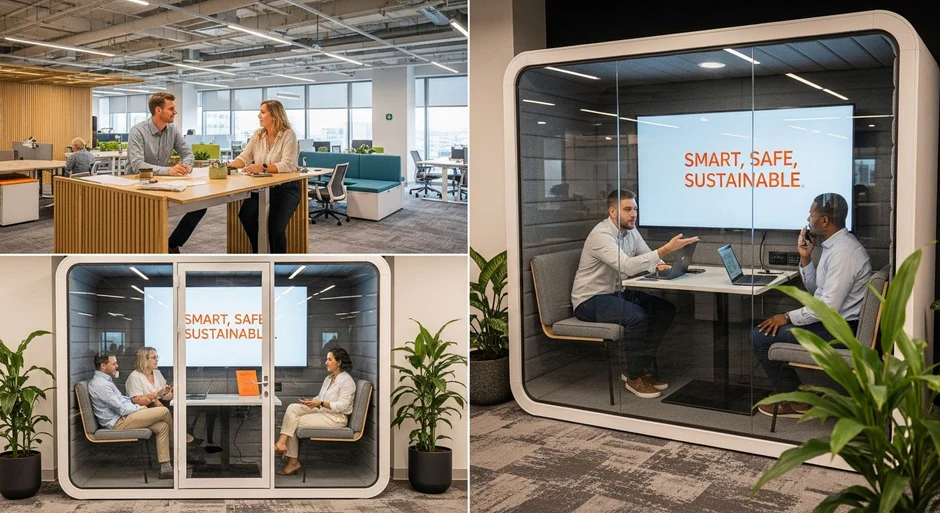
- Small call spaces or booths so video calls do not take over open desks or full meeting rooms.
- Informal break areas that pull social chatter away from desks.
Get ergonomics right at every desk
Ergonomic furniture is the foundation that makes the rest of the space work. Look for chairs with adjustable seat height and lumbar support, desks at the right height (or sit-stand desks where budgets allow), and monitor arms or risers so the top of the screen sits roughly at eye level. In the UK, employers have legal duties around display screen equipment, including workstation assessments, and the Health and Safety Executive publishes clear guidance on setting up a workstation.
Map real traffic patterns
Before moving furniture, watch how people move for a week. Where do queues form? Which desks sit beside the printer or kitchen and suffer constant footfall? Put shared equipment and busy routes away from focus seating, and keep frequently used storage close to the people who need it.
2. Control Light and Air Quality
Light and air are the invisible productivity factors. When they are poor, people feel tired and unfocused without knowing why.
Make the most of light
- Prioritise daylight. Arrange desks so people get natural light without sitting with a window directly in front of or behind their screen.
- Add adjustable task lighting so individuals can top up light where they need it, rather than relying solely on harsh overhead fittings.
- Replace flickering or tired fluorescent tubes with good-quality LED fittings, which are more consistent and cheaper to run.
- Tackle glare at the source. Blinds help, and for offices struggling with glare or solar heat gain through large windows, film for windows is a practical option that improves screen visibility and comfort without blocking the view.
Keep the air fresh
Stale, warm air dulls concentration. Make sure ventilation systems are maintained and actually running at sensible rates for the number of people in the room. Simple steps such as opening windows where possible, avoiding overcrowding in small meeting rooms and using air purifiers in poorly ventilated spaces all help. Plants can make a space feel more pleasant, but they are not a substitute for proper ventilation.
Manage temperature sensibly
Temperature complaints are one of the most common sources of friction in any office. HSE guidance sets out a minimum of around 16°C for workplaces where people mainly sit, but comfort for desk work is usually a few degrees warmer than that. Zoned heating and cooling, smart thermostats and moving desks away from draughty doors or hot windows all reduce the daily thermostat wars.
3. Solve the Noise Problem
Open-plan offices made collaboration easier but often made concentration much harder. The problem is not just volume; it is unpredictable, intelligible sound, such as nearby conversations and phone calls, that pulls attention away.
Layer your acoustic solutions
- Absorb: carpet, acoustic ceiling tiles, wall panels and soft furnishings reduce echo and the distance that sound travels.
- Block: desk screens, bookshelves and partitions break up direct sound paths between noisy and quiet areas.
- Cover: sound masking or low-level background sound makes distant conversations less intelligible and therefore less distracting.
Set clear audio boundaries
Agree team norms: calls happen in booths or call rooms, quiet zones are respected, and headphones on means “please message rather than interrupt”. These rules cost nothing and often make more difference than equipment.
4. Use Technology That Actually Saves Time
Technology should remove steps from the working day, not add new systems to maintain. Before buying anything, list the repetitive tasks that eat time, then look for tools that eliminate them.
Automate repetitive work
Workflow automation platforms such as Zapier and Microsoft Power Automate connect different apps, so data moves between systems without manual copying. Project management tools such as Asana, Trello and Monday.com put tasks, owners and deadlines in one place, which reduces status-update emails and missed handovers.
Simplify scheduling and documents
Scheduling tools such as Calendly cut the back-and-forth of arranging meetings. Shared document platforms like Google Workspace, Microsoft 365 and Dropbox reduce version-control problems and make files easier to find.
Keep office equipment reliable
Equipment downtime is a hidden time sink. For document-heavy teams, photocopier rental gives access to modern, maintained machines without the upfront cost and repair headaches of ownership. The same logic applies to laptops, headsets and meeting-room kit: reliable equipment that people know how to use beats the latest model sitting idle.
Consolidate communication
Unified platforms such as Slack, Microsoft Teams and Zoom bring messaging, calls and file sharing together. The gain comes from clear rules, though: which channel is for urgent issues, which for updates, and when people are expected to reply. Without those norms, chat tools can become another source of constant interruption.
5. Build Flexibility into Your Work Culture
Rigid schedules ignore the fact that people concentrate best at different times and in different settings. Flexibility, applied with clear structure, tends to improve both output and retention.
- Core collaboration hours: agree a window when everyone is available for meetings and quick questions, then let people arrange the rest of their day around their most productive periods.
- Protected focus time: block meeting-free mornings or afternoons so deep work has a home in the calendar.
- Sensible breaks: encourage people to step away from the screen regularly. Short breaks between focused blocks help sustain attention across the day.
- Choice of setting: offer a mix of desks, standing areas, quiet rooms and informal seating so people can match the space to the task.
- Optional activity: walking meetings or short stretch sessions can lift energy, but they work best as genuine options rather than mandates.
6. Invest in Employee Wellbeing as a Performance Strategy
Wellbeing programmes are not just perks. Staff who are rested, healthy and feel valued make fewer mistakes and are less likely to leave, which saves recruitment and training costs.
Support mental health
Make support easy to find: an employee assistance programme, trained mental health first aiders, manageable workloads and managers who know how to have a supportive conversation. Spotting stress early is far cheaper than dealing with burnout and long-term absence later.
Make feedback continuous
Annual reviews alone are too infrequent to guide day-to-day work. Regular one-to-ones, clear goals and ongoing performance feedback help people correct course early and feel that their effort is noticed. Recognition does not need to be elaborate; specific, timely thanks goes a long way.
Look after physical comfort
Adjustable workstations, decent chairs, access to drinking water and somewhere to eat away from the desk all contribute to sustained energy. Encourage people to report discomfort early rather than putting up with it.
How to Prioritise Your Office Efficiency Strategies
You do not need to do everything at once. The table below gives a practical way to sequence the work based on typical cost and effort.
| Area | Typical cost level | Quick wins | Bigger projects |
|---|---|---|---|
| Layout and zoning | Low to high | Move noisy equipment, create a quiet corner | Reconfigure the floor plan, add booths |
| Ergonomics | Low to medium | Workstation assessments, monitor risers | Sit-stand desks, new seating |
| Light and air | Low to medium | Reposition desks, add task lamps, service ventilation | LED upgrades, window film, improved ventilation |
| Noise | Low to medium | Team quiet rules, call etiquette | Acoustic panels, sound masking |
| Technology | Low to medium | Automate one repetitive process | Consolidate platforms, upgrade equipment |
| Culture and wellbeing | Low | Core hours, focus time, regular one-to-ones | Formal wellbeing programme, manager training |
A simple order of attack works for most teams:
- Ask your staff. A short anonymous survey on noise, temperature, equipment and interruptions will point straight at the biggest pain points.
- Fix the free things first: team norms, desk positions, focus time and meeting discipline.
- Tackle comfort basics: ergonomics, lighting and temperature, because discomfort undermines everything else.
- Address noise and layout once you know how people actually use the space.
- Introduce technology to remove specific, named bottlenecks.
- Review after a quarter and adjust based on what changed.
Why Office Efficiency Drives Often Fail
- Solving one factor in isolation. New chairs will not help much if the lighting is poor and the room is noisy.
- Buying tools without changing habits. A new platform layered on top of old processes simply adds work.
- Not asking the people affected. Changes imposed without input often miss the real problems.
- No measurement. Without a baseline, you cannot tell whether anything improved.
- Treating it as a one-off project. Teams, tools and workloads change, so the office should be reviewed regularly.
How to Measure Whether It Is Working
Pick a small set of indicators before you start and track them over time: staff survey scores on comfort and focus, absence levels, project delivery against deadlines, the number of hours spent in meetings and the volume of recurring IT or equipment issues. Combine the numbers with conversations, because people will tell you what is still getting in the way.
Frequently Asked Questions
What is the most cost-effective way to improve office productivity?
Start with low-cost changes: team norms on interruptions, protected focus time, repositioning desks for better light and proper workstation set-ups. These cost little and make every later investment more effective.
How do I know which office efficiency strategies to prioritise?
Ask your team where time and energy are being lost, using a short anonymous survey. Then fix comfort basics such as ergonomics, light and temperature before investing in larger layout or technology projects.
Does an open-plan office reduce productivity?
Open plan can help collaboration but often hurts concentration because of noise and interruptions. Adding quiet zones, call booths, acoustic treatment and clear etiquette usually gives you the benefits without the main drawbacks.
What temperature should an office be?
HSE guidance sets a minimum of around 16°C for workplaces where people mainly sit, though most people find desk work comfortable a few degrees above that. Zoned controls and sensible desk positions help keep everyone comfortable.
How do I measure whether efficiency improvements are working?
Set a baseline first, then track staff survey scores, absence, delivery against deadlines and time spent in meetings. Review the results after a quarter and adjust what is not working.
Bottom Line on Office Efficiency Strategies
The offices that consistently perform well are not necessarily the most expensive. They are the ones where layout, light, air, acoustics, technology and culture all support focused work instead of fighting it. Ask your team where friction lies, fix the free and low-cost issues first, then invest step by step in the changes that remove the biggest bottlenecks, and measure as you go.